How to Use Novita AI in ForgeCode: Quick Guide
Novita will be available as a provider in ForgeCode starting in v2.2.2.
If you want to use it, the setup is straightforward: create a Novita API key, run :login, select Novita, paste the key, and choose a model.
This post covers what Novita is, why you might want it in ForgeCode, and how to get set up quickly.
TL;DR
- Novita will be available in ForgeCode starting in v2.2.2
- Novita is an AI platform that gives you API access to multiple models
- If coding-heavy usage matters to you, Novita's Coding Plan is worth checking
- You can create your API key from Novita's API Keys page in under a minute
- In ForgeCode, the setup is still simple:
:login→ Novita → API key →:model - A good first model to try is Kimi K2.5, then compare it against GLM-5 and MiniMax M2.5 on real work
What is Novita?
Novita is an AI platform that gives developers access to multiple models through its API and related tooling.
For ForgeCode users, the important part is simple: it is another provider you can plug into the same terminal workflow you already use.
Why use Novita in ForgeCode?
The case for Novita in ForgeCode is practical:
- Multiple coding models: you can try Kimi K2.5, GLM-5, and MiniMax M2.5 without changing your overall workflow
- Simple provider setup: create a key, run
:login, choose Novita, and pick a model - Cost and usage flexibility: Novita's Coding Plan is aimed at coding-heavy usage with more tokens and lower cost
- Easy comparison: you can switch providers and compare model behavior on the same real tasks inside ForgeCode
That is the main reason to care. Adding a provider is only useful if it gives you models worth testing without adding setup friction.
Before you use Novita in ForgeCode: create your Novita API key
If you do not already have a Novita key, create that first.
Step 1: Sign in to Novita
Go to novita.ai and sign in or create an account.
If you plan to use Novita for regular coding work, it is also worth looking at the Novita Coding Plan, which is aimed at coding-heavy usage with more tokens and lower cost.
Step 2: Open the API Keys page
After signing in, open the profile menu and choose API Keys.
That takes you to Account Settings with the Key Management tab open.
You can also go directly to API Key Management.
Step 3: Click Add New Key and copy it somewhere safe
On the Key Management screen, click Add New Key. Copy the key when it is generated and keep it ready for the ForgeCode login flow.
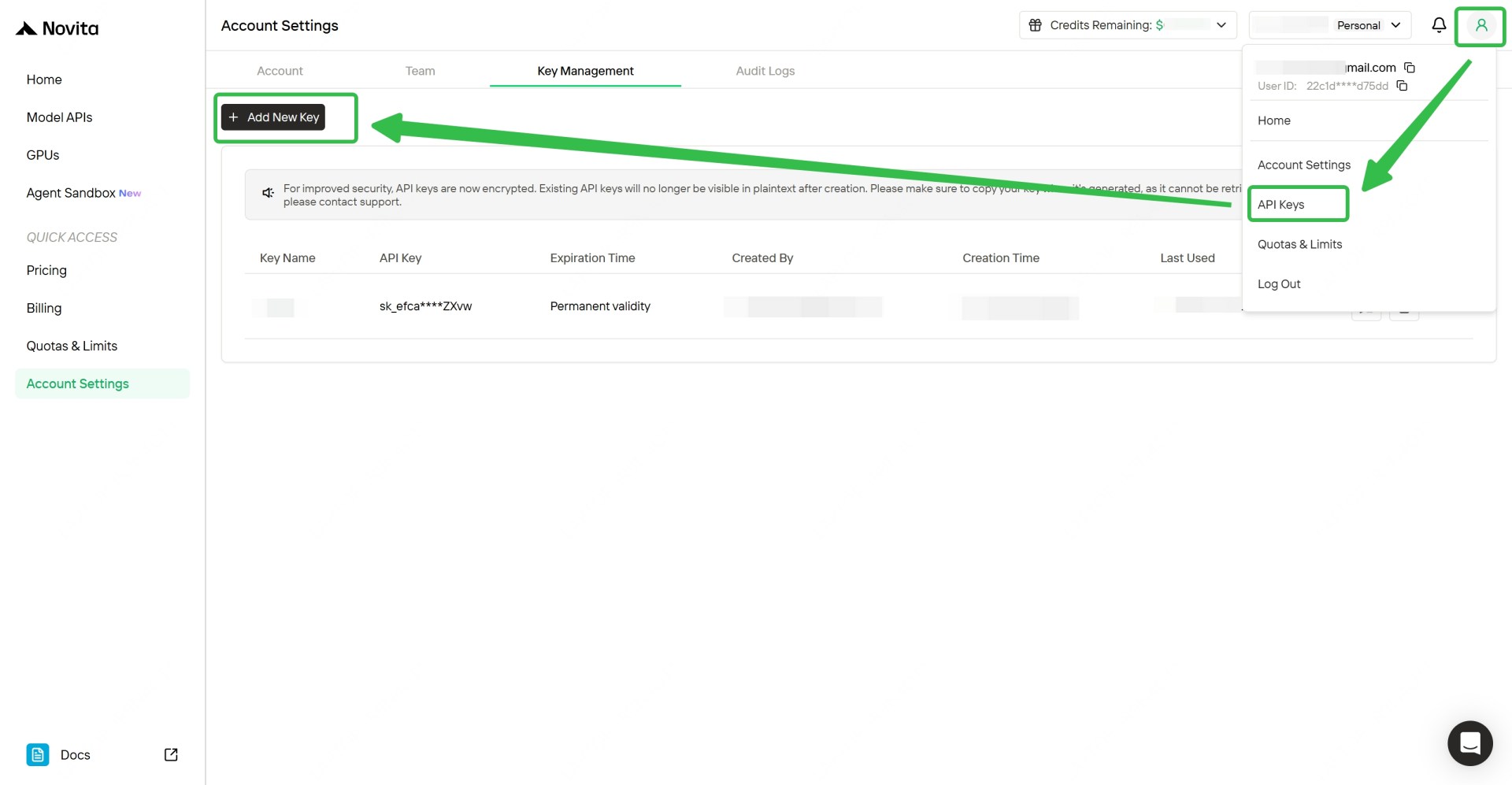
Novita's API key management screen shows the path clearly: profile menu → API Keys → Account Settings → Key Management → Add New Key. At this point, you are done with the only part that happens outside ForgeCode.
The ForgeCode setup flow
That is the whole flow. The provider changes. Your workflow does not.
Step 1: From your terminal, run :login and choose Novita
Because ForgeCode is available as a zsh plugin, you do not need a separate app-launch step.
The terminal demo below shows the full login flow: run :login, select Novita, enter a masked API key, confirm the provider switch, and continue to model selection.
After that, you are ready to pick a model.
Step 2: Pick a Novita model
Once login is complete, open the model picker:
:model
Search for a Novita model and select it.
If you want the obvious first pick for real work, start with Kimi K2.5.
Which Novita models can you try in ForgeCode?
The current lineup includes three models:
| Model | Good starting use case | Notes |
|---|---|---|
| Kimi K2.5 | General coding, reasoning, tool use | Best first model to try |
| GLM-5 | Coding and structured reasoning | Good for broader comparison testing |
| MiniMax M2.5 | Long-context coding tasks | Worth trying on larger coding sessions |
If you want a fast sanity check, start with Kimi K2.5. Then compare it against GLM-5 and MiniMax M2.5 on actual coding work, not toy prompts.
A provider becomes real when you stop evaluating it in isolation and start using it on refactors, debugging sessions, test fixes, and migration work.
FAQ
Do I need anything besides a Novita API key?
No. Once you have the key, ForgeCode setup is just :login, choose Novita, paste the key, and select a model.
Which model should I try first?
Start with Kimi K2.5. It is the easiest first pass for everyday ForgeCode usage.
Why mention the Novita Coding Plan here?
Because cost and model access are part of the provider decision. If you plan to use Novita regularly for coding, the Coding Plan is part of the reason the provider is worth evaluating.
Do I need to change how I prompt or work?
No. The point is that you keep using ForgeCode the same way you already do.
What to do next
If you want to try it, create your Novita API key, connect Novita with :login, and then use :model to start with Kimi K2.5.
After that, give it something messy enough that you can judge it honestly. That is the fastest way to decide whether Novita deserves a permanent place in your workflow.